

5 Best Free Box Dieline Generator in 2025
Discover the best free dieline generators, how to make accurate die-cut templates, and production-ready tips for custom packaging (PDF/SVG/DXF)
Contact Us now
Table of content

Ready to Elevate Your Brand with 100% Custom Box & Bag Solutions?
Get a Free QuoteIf you work in packaging — whether you design rigid boxes for perfume, folding cartons for cosmetics, corrugated mailers for e-commerce, or gift box runs for retail — the dieline is the single technical file that turns a sketch into something manufacturable. A dieline (or die-cut template) tells the cutter where to cut, where to crease, and how to place the artwork so the final package folds and functions exactly as intended. Using the right dieline generator saves design hours, reduces waste, and prevents costly sample remakes.
This guide covers everything you need: reliable free dieline generators, when to use hobbyist template tools versus production-grade generators, step-by-step dieline creation, common errors to avoid, file formats for printers, and how GUKA Packaging supports brands with dieline-ready production for markets like the U.S., Europe, Canada and Australia.
To make the guide practical, we’ve reviewed industry tools and standards (Packly, DesignNBuy, TemplateMaker.nl, Cefbox and FEFCO guidelines) and pulled actionable workflow advice you can use today.
What Is a Dieline (Die-Cut Template) and Why It Matters
A dieline is a vector technical drawing that maps every cut, fold (crease), perforation, and bleed for a package. Think of it as the engineering blueprint for packaging. The dieline communicates exactly how a flat sheet of board becomes a 3D box — which panels form the front, where the glue tab is, where the tuck flap sits, and how much bleed the artwork needs to avoid white edges.
Accurate dielines are business-critical for three reasons:
- Manufacturability: Printers and die-cutters rely on precise lines — misplaced creases or wrong tab widths lead to misfolded packages. Professional generators produce files precise to hundredths of a millimetre, preventing production defects.
- Cost: Wrong dielines cause wasted boards and add sample rounds. Automated dieline generation reduces design time and rework.
- Consistency across regions: Export markets (U.S., EU, Australia) often expect standardized box types and clear communication. Referencing FEFCO codes and other standards helps suppliers and printers work efficiently.
Free vs. Professional Dieline Generators — How to Choose
Not all dieline tools are the same. The two major categories are:
1. Free / Hobbyist Template Makers
Great for mockups, craft, and rapid prototyping. These tools (for example TemplateMaker.nl) export PDF, SVG, and DXF files and are extremely useful for designers who need a quick structure or for classroom and hobby use. They are free and fast, but templates may not always follow production tolerances or industry standards.

2. Professional Web-to-Pack and Dieline Generators
Built for print houses and packaging businesses. These services (DesignNBuy, Cefbox, Pacdora, Newprint, etc.) produce production-grade dielines, offer parametric controls for board thickness and machine constraints, and often include 3D previews and export options tailored for printers (AI, PDF with cut/crease layers, DXF). If you sell packaging at scale or supply retailers, using a production-grade generator is recommended.
When to use which:
- Quick mockup for concept → TemplateMaker.nl or local SVG export.
- Print-ready packaging for clients or to send to a die-cutter → Packly, Cefbox, Pacdora, or other web-to-pack solutions.
Top Free Dieline/Template Tools
Below are some dependable free resources to try immediately. Each has pros and cons depending on whether you need DIY mockups or production-grade files.
1. TemplateMaker.nl
Free online box & envelope templates that export PDF, SVG, DXF. Excellent for quick, custom-sized folding boxes and craft projects. Not always production-grade; check tolerances before sending to a commercial die-cutter. templatemaker.nl

2. Pacdora (free templates section)
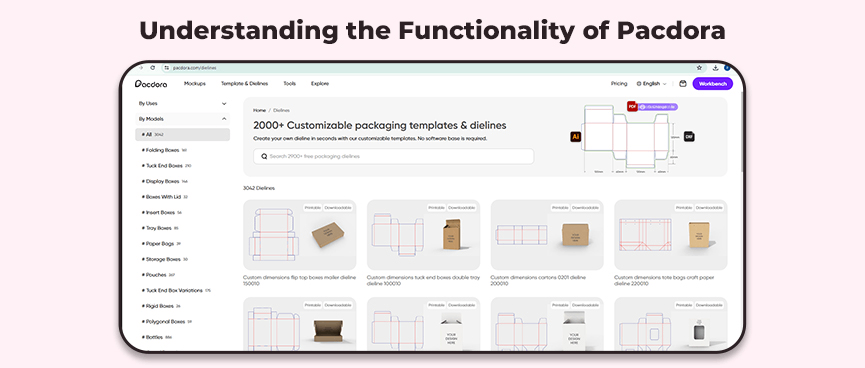
Offers thousands of templates and an online customization tool; many templates and downloads are free or freemium. Good bridge between free and pro workflows. Pacdora

3. Cefbox Dieline Generator
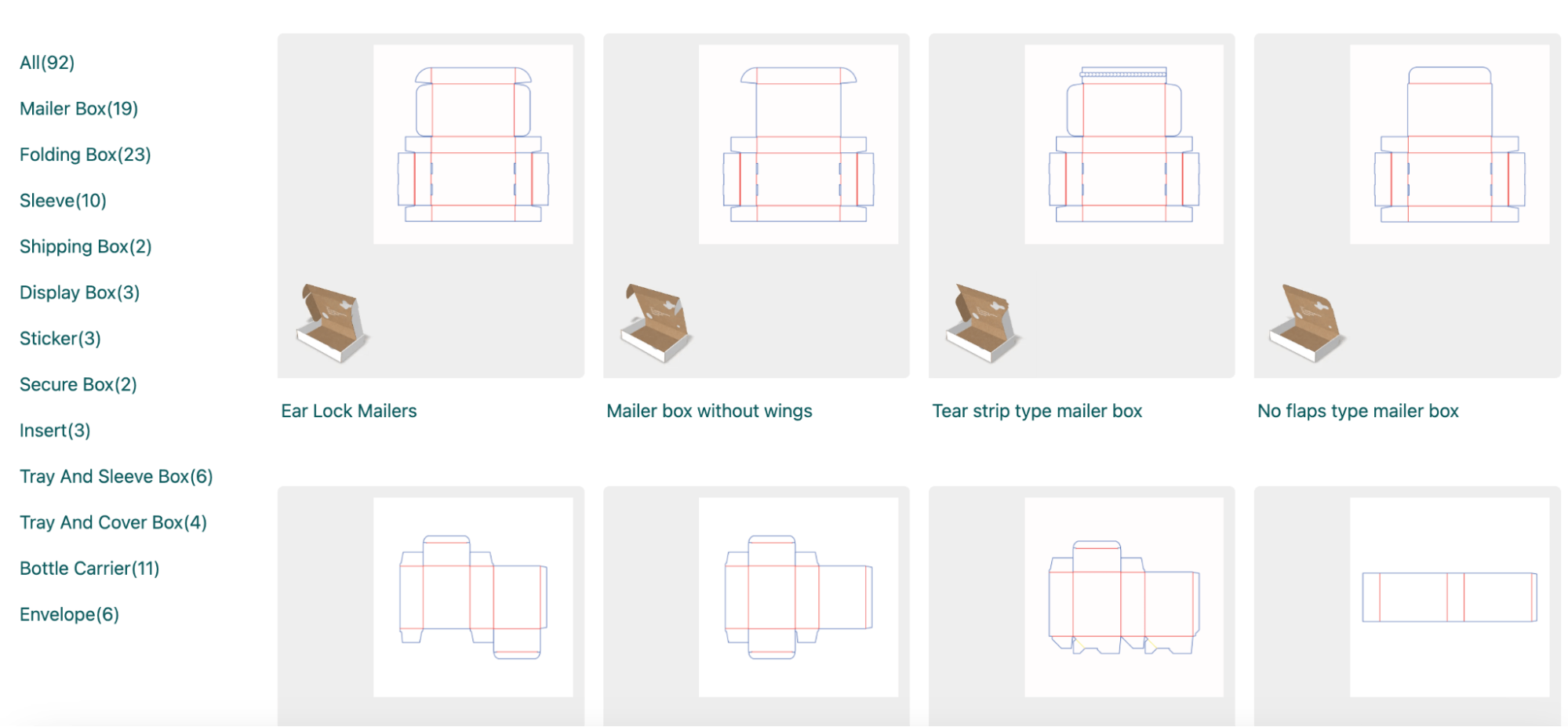
Provides production-ready dielines for common box styles with PDF and DXF exports; positioned as a tool for print-ready output. Useful if you want accuracy without building dielines from scratch. cefBox
4. 3DMockup.co
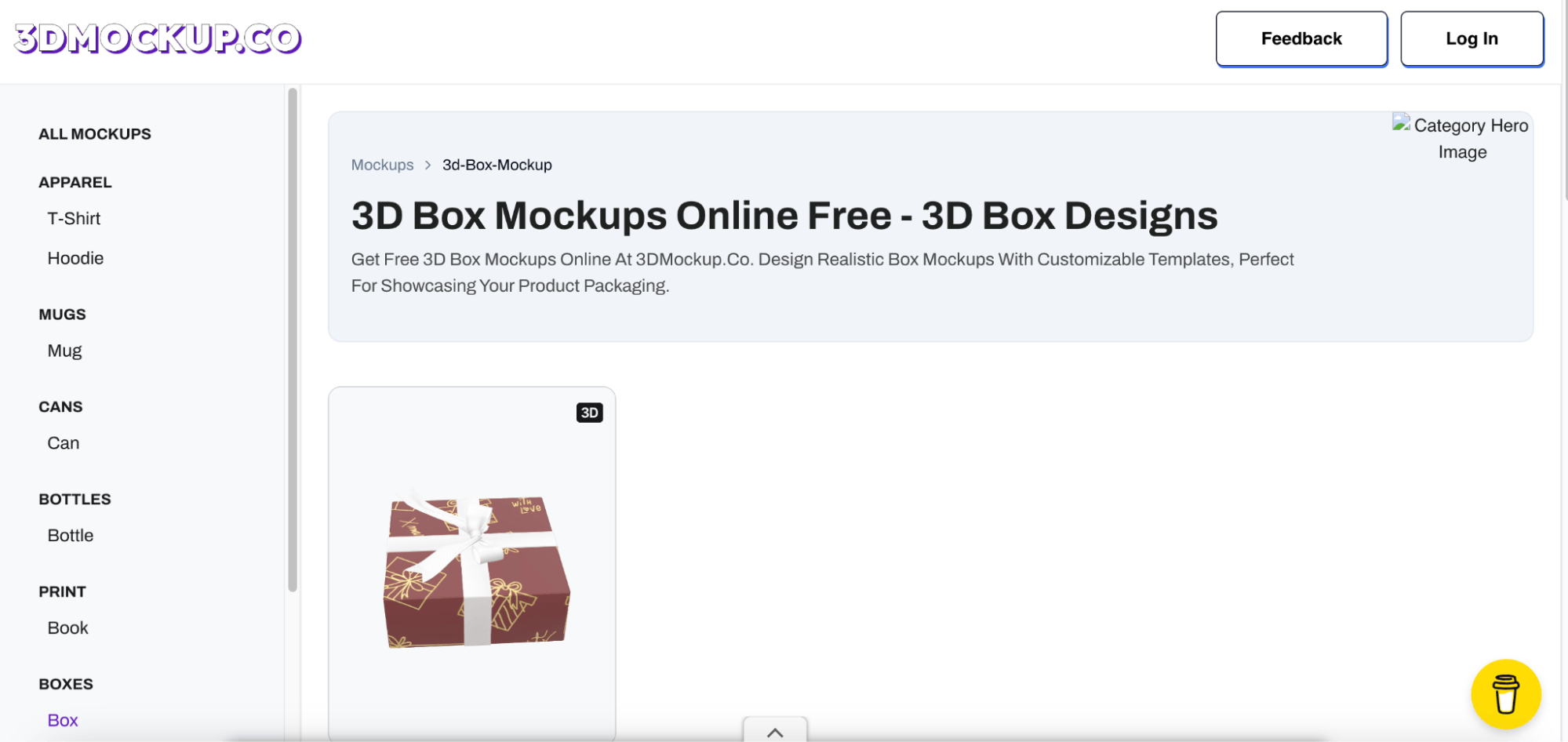
If your priority is convincing 3D visuals together with dielines, mockup services can help visualize the assembled box. They’re handy for marketing previews but verify underlying dieline accuracy separately. 3D Mockup
5. Note on Guarantees and File Compatibility
Many free tools are intended for prototyping; before sending a dieline to production, always confirm the required file type (AI/PDF with layers, DXF for die-cutters), line colour conventions (cut vs crease), bleed specs, and whether the file adheres to industry standards like FEFCO for corrugated types.
How Professional Dieline Generators Work (what to expect)
Production-grade dieline generators automate the technical heavy lifting while letting you control essential variables:
- Choose a base model (tuck-end, straight tuck, reverse-tuck, mailer, sleeve + tray, rigid set-up style).
- Input precise dimensions (internal dimensions or product size + tolerance). Many tools accept custom dimensions and auto-calculate panel sizes.
- Specify material thickness and fluting/board type, which affects creasing allowances and glue-tab width. Professional tools let you set thickness (for example, from 0.2 mm up to production limits) to ensure creases and tuck tabs fit.
- Preview in 3D to validate folds and graphics placement where available. 3D previews reduce the risk of misaligned artwork or panels that collide after folding.
- Export layered vector files: cut lines, crease lines, perforations, and bleed are exported as separate layers with color-coding conventions (e.g., cut = blue, crease = red, outside bleed = green) to avoid confusion at the press.
A generator that can produce files precise to the hundredth of a millimetre and offer common export formats (PDF/X, AI, DXF) greatly shortens the time from concept to production.
Step-By-Step: How to Make a Production-Ready Dieline
This workflow works whether you use an online generator or build a dieline in Illustrator with an experienced prepress operator.
- Start with the product measurement. Decide internal dimensions: length × width × height of the product including any protective padding. Add clearance (usually 1–3 mm per side depending on product rigidity and material).
- Select box style. Choose a structure that suits your product and branding (e.g., straight tuck for retail, mailer for shipping, rigid set-up for luxury). If you need corrugated styles, reference FEFCO codes to standardize communication with manufacturers.
- Choose material & thickness. Material choice (SBS, CCNB, grayboard for rigid boxes, or corrugated flute types) determines creasing allowances and machine feasibility. Note any print finishes (hot foil, emboss) that may affect dimensions.
- Generate or draft the dieline. Use a generator to auto-calc panels, or create vector paths in Illustrator. Ensure layers for cuts, creases, perforations, and bleeds are separate and labelled. Production tools often color-code those layers automatically.
- Check bleed and artwork placement. Extend background graphics to the bleed line (typically 3–5 mm for folding cartons; more for heavy boards). Keep critical text and logos inside a safe zone.
- Validate with a 3D preview / paper mock-up. Even with a perfect dieline, a physical or on-screen fold test ensures tuck flaps and interlocks fit. 3D plug-ins or mockup services help at scale.
- Export to production formats. Common formats: PDF (press-ready with fonts outlined), DXF (for die-cutters), AI/EPS when the printer requests native vector files. Include a notes layer with material, glue, and finishing instructions.
Common Dieline Mistakes — and How to Avoid Them
Packaging production wastes time and money when the dieline has avoidable problems. Here are frequent errors and prevention tactics:
- Wrong units or measurement errors: Always double-check units (mm vs inches) and confirm whether dimensions refer to internal or external sizes.
- Insufficient glue tab / overlap: If the glue tab is too narrow or the fold allowance inadequate for the chosen board, the box may fail during gluing. Use the tool’s recommended glue tab width for the thickness selected.
- Incorrect crease depth or spot placement: Crease lines must be placed considering the board thickness and die rules. Automated generators account for that; manual dielines require consultation with your die-maker.
- Artwork too close to cuts: Keep type and important imagery inside the safe area; bleed only ensures background elements don’t show white edges.
- Not verifying with the cutter: Some die-cutters require DXF with specific line types or a single continuous cut path. Clarify file requirements early.
File Format Checklist for Sending Dielines to printers
When you send files to a printer or die-cutter, include:
- Press-ready PDF with cut/crease/perf on separate labeled layers (often color-coded).
- DXF or DWG file for the die-cutter if requested.
- A flattened artwork PDF showing final graphics as they should appear (useful for quick approvals).
- A production spec sheet: board type, thickness, finishing, glue method, and any FEFCO code if using corrugated styles.
How GUKA Packaging Fits Into This Workflow
At GUKA Packaging we work with brands across cosmetics, perfumery, luxury goods, food, electronics, and e-commerce. We supply custom rigid boxes, folding cartons, and corrugated solutions tailored for U.S., European, and Australian retailers. Our team provides:
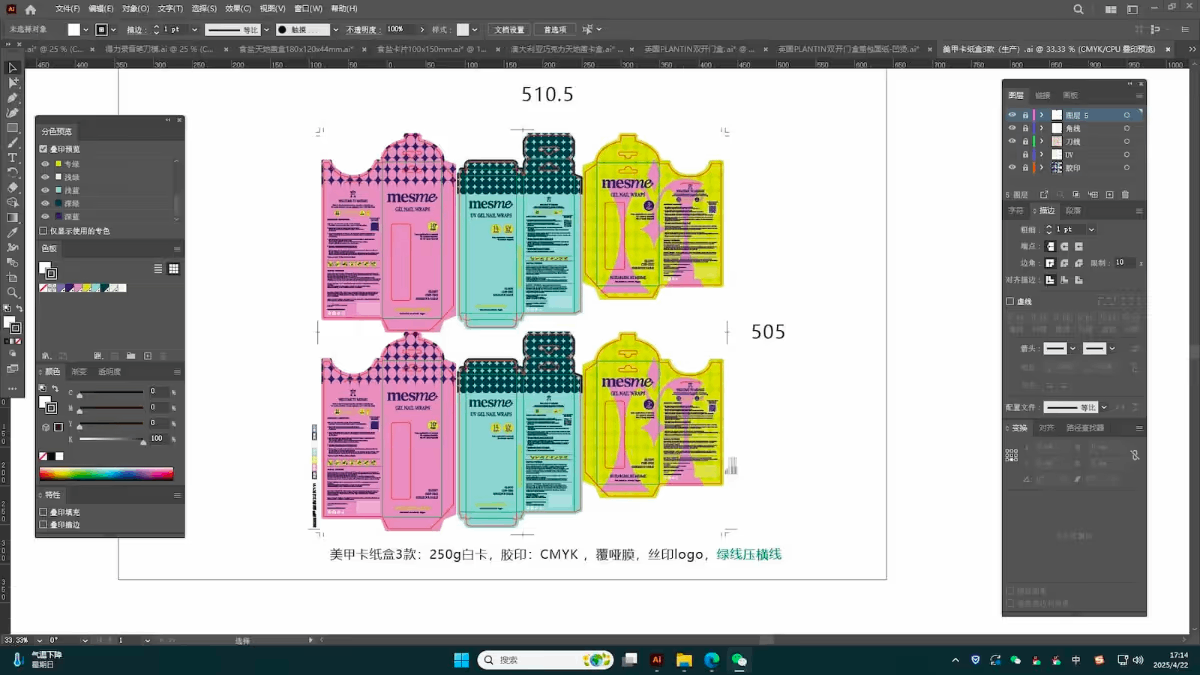
- Dieline validation and adjustment for your chosen box style and material (we check tolerance, glue tab, and machine feasibility).
- Prepress support — converting your dieline into press-ready PDF/DXF and advising on line colors and layers for die cutters.
- Prototyping and sampling — we produce physical samples for approval and can iterate quickly before full production.
- Compliance and standards alignment — we reference FEFCO/industry standards for corrugated items and advise on Good Manufacturing Practices (GMP) where relevant.
If you want GUKA to check a dieline, upload your file to our sample request page or contact our design team for a free initial review:
Frequently Asked Questions to Box Dieline Generator
Q: Are there free dieline generators that produce print-ready files?
Yes — some services provide free downloads in PDF/DXF formats (TemplateMaker, Pacdora’s free templates, Cefbox offers downloadable dielines). However, always validate tolerances and line conventions before sending to an industrial press.
Q: What file format do die-cutters prefer?
DXF is commonly used for die-making because it contains vector paths suitable for CNC or die cutters. Printers often want layered PDFs or AI files with separate layers for cuts/creases/bleeds. Confirm with your vendor.
Q: Can I use a free template for commercial packaging?
Yes, but check the template’s license and ensure it meets the printer’s technical requirements. Many hobbyist templates are fine for small commercial runs, but for retail distribution or automated die cutting, professional dielines are recommended.
Q: What are FEFCO codes and why do they matter?
FEFCO codes categorize corrugated box designs for clear industry communication (e.g., FEFCO 0201 for a regular slotted container). Using these codes speeds up specification and production for corrugated solutions.
Recommended for you


.avif)
.avif)



.avif)
.avif)

Discover more options


.avif)
.avif)
You might enjoy
We deliver high-quality packaging solutions for professional brands and businesses





